The ideal TikTok sticker size is 720 × 720 pixels (1:1 square), exported as a 30 fps, muted H.264 MP4 lasting 3 to 5 seconds. If you are designing a seamless multi-tile sticker banner across your profile's Stickers tab, account for TikTok's 7.3% grid gap (~52.5 px per gap) and build your master canvas at 2265 × 720 px (3 stickers), 2265 × 1493 px (6 stickers), or 2265 × 2265 px (9 stickers).
Getting the pixel math right before you export prevents the two most common banner mistakes: blurry upscaled stickers and broken diagonal lines between tiles.
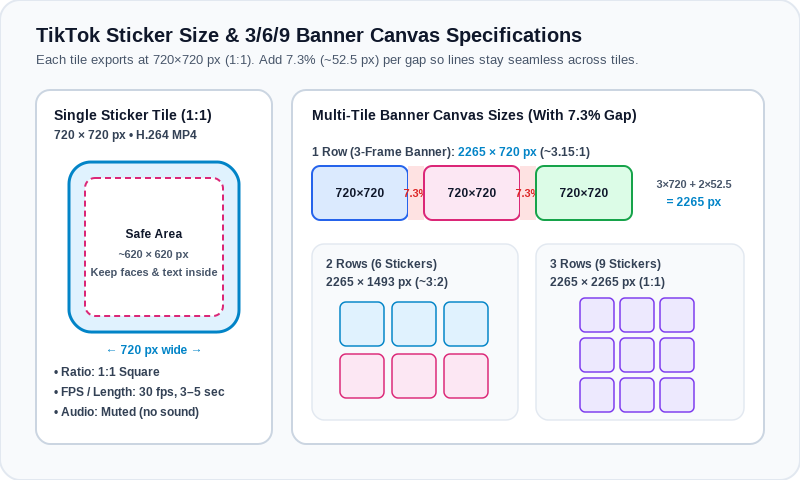
Complete TikTok Sticker Size & Resolution Cheat Sheet
Use these exact dimensions whether you are designing in Photoshop, Canva, Figma, Procreate, or slicing automatically in your browser.
| Layout Type | Grid (Cols × Rows) | Master Canvas Size (Gap-Aware) | Single Exported Tile | Aspect Ratio | Recommended File Format |
|---|---|---|---|---|---|
| Single Sticker | 1 × 1 | 720 × 720 px | 720 × 720 px | 1 : 1 | H.264 MP4, 30 fps, 3–5s, muted |
| 3-Frame Banner | 3 × 1 | 2265 × 720 px | 3 × (720 × 720 px) | ~3.15 : 1 | 3 numbered MP4 slices |
| 6-Frame Banner | 3 × 2 | 2265 × 1493 px | 6 × (720 × 720 px) | ~3 : 2 | 6 numbered MP4 slices |
| 9-Frame Banner | 3 × 3 | 2265 × 2265 px | 9 × (720 × 720 px) | 1 : 1 | 9 numbered MP4 slices |
Why 720 × 720 px (and Not 4K)?
On a phone screen, each sticker in the 3-column Stickers tab occupies roughly one-third of the viewport width. Uploading 4K files forces TikTok's server encoder to re-compress aggressively, which often introduces artifacts or softens animated edges. Exporting clean 720 × 720 px clips at 30 fps matches TikTok's display pipeline while keeping uploads fast and crisp.
Why 2160 × 720 Breaks Alignment (The 7.3% Gap Math)
Most manual tutorials tell creators to multiply 720 × 3 = 2160 px and chop the image into three edge-to-edge squares. That looks fine in your camera roll—and breaks immediately on TikTok.
Here is the exact pixel calculation behind TikTok's Stickers tab:
- Tile width:
720 px - Visual gap between tiles:
~7.3%of tile width =720 × 0.073 ≈ 52.5 px - 3-column total width:
(3 × 720) + (2 × 52.5) = 2160 + 105 = 2265 px - 2-row total height (6-frame):
(2 × 720) + (1 × 52.5) = 1440 + 52.5 ≈ 1493 px - 3-row total height (9-frame):
(3 × 720) + (2 × 52.5) = 2160 + 105 = 2265 px
When you skip those 52.5 px gap strips instead of keeping them inside adjacent tiles, diagonal lines, typography, and character outlines pass smoothly "behind" the profile grid spacing—just like looking through a window frame.
Don't want to calculate pixel offsets in Photoshop? Upload any image, GIF, or video to our free TikTok Sticker Banner Maker. Toggle Gap-Aware Cut on, preview the real mobile grid, and export ready-to-upload 720×720 MP4 slices in one click—100% in your browser with no watermark.
Corner Safe Zone & File Format Rules
1. Respect the Rounded Corner Safe Zone (~620 × 620 px)
TikTok displays every sticker tile with rounded corners. If you place letters, eyes, or logos right at the outer 40–50 pixels of a 720 × 720 square, the rounded mask will clip them. Keep key focal points inside the central 620 × 620 px safe zone—or nudge your crop smoothly inside the live phone simulator before exporting.
2. Static PNG / Transparent PNG vs. MP4 Video
Many searches ask for a TikTok sticker banner template PNG or transparent PNG. Keep two platform limitations in mind:
- No direct PNG upload to Profile Stickers: TikTok's Share → Create sticker flow only works on video posts. A static photo or PNG must be wrapped into a short 3-second 720×720 MP4 first.
- No transparent background on profile grids: Even if you start with a transparent PNG, video posts flatten transparency onto a solid background (dark
#141416blends cleanly with TikTok dark mode, while white blends with light mode).
3. Next Step After Exporting Your 720×720 Slices
Once your slices are sized correctly, two final steps guarantee a flawless profile banner:
- Upload them in the exact reverse sequence so the grid does not appear backwards (read the 3, 6 & 9 Sticker Banner Order Guide).
- Make sure all three privacy gates are enabled so visitors can see them (read How to Make TikTok Stickers Public).
Want pre-calibrated visuals right now? Explore our 50+ Free TikTok Sticker Banner Templates already framed for 3/6/9 layouts.
Frequently Asked Questions
What is the exact TikTok sticker size in pixels?
Each individual TikTok profile sticker is 720 × 720 pixels (1:1 square), ideally exported as a muted 30 fps H.264 MP4 lasting 3 to 5 seconds.
What canvas size should I use for a 3-frame, 6-frame, or 9-frame TikTok sticker banner?
Use 2265 × 720 px for a 3-frame row, 2265 × 1493 px for a 6-frame grid (3×2), and 2265 × 2265 px for a 9-frame grid (3×3). These sizes include the 7.3% (~52.5 px) grid gaps between tiles.
Why does slicing a 2160 × 720 image into three 720 × 720 squares look misaligned on TikTok?
A 2160 × 720 canvas ignores the empty spacing between TikTok's profile tiles. Without removing ~52.5 px of gap width between cuts, straight lines and text shift out of alignment on your profile.
Can I upload a PNG or transparent PNG directly as a TikTok profile sticker?
No. Profile stickers must be generated from public video posts. Convert each PNG tile into a 3-second 720×720 MP4 clip first (our homepage tool exports both PNG and 3-second MP4 slices automatically).
What is the safe area inside a 720 × 720 TikTok sticker?
Keep text, logos, and faces inside the inner 620 × 620 px safe area (about 50 px margin on all four sides) so TikTok's rounded tile corners do not crop them.